# How I Queried Hashnode's GraphQL API to display my hashnode blog posts on my Nuxt Website
Hi there dev,
I am Idris (if you don't already know), I recently started building my portfolio website at [idrislawal.com](https://idrislawal.com) with Nuxt JS and realized I needed to have my blog posts from hashnode also on my website, so I thought to myself, how do I make this happen? I contacted @[Bolaji Ayodeji](@bolajiayodeji) to enquire about hashnode's API and he directed me to [api.hashnode.com](https://api.hashnode.com) which is a graphQL playground to tryout hashnode's APIs and see the expected responses, it also contains the necessary documentation of all the APIs. Screenshots below.
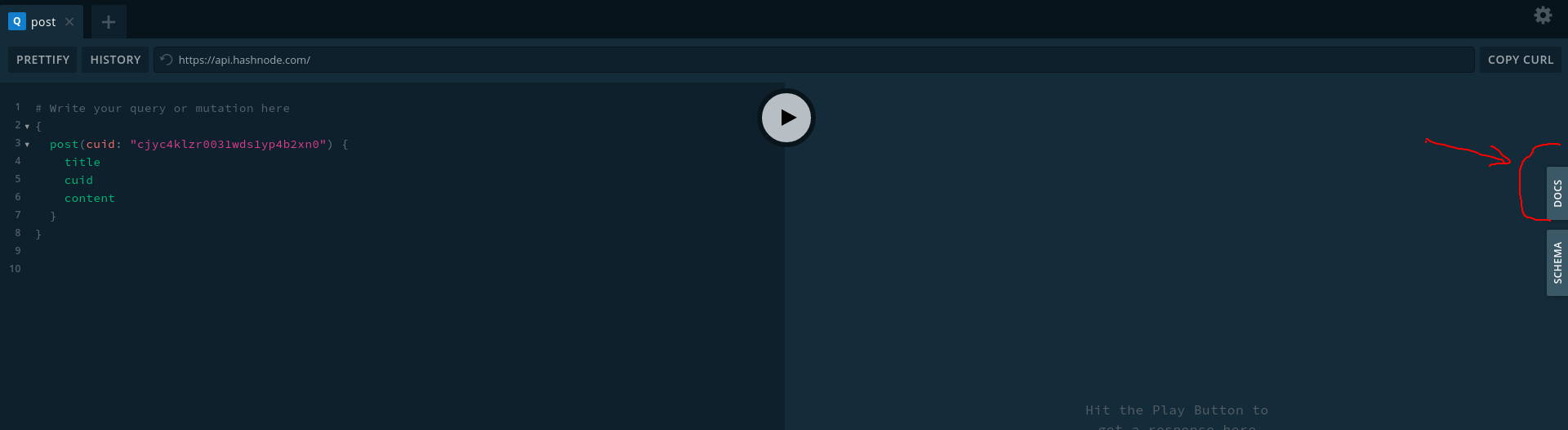
The red arrow on the right shows the documentation panel and on the left is a sample query.
The focus in this article will be how I queried the API to get what I needed. So what did i need? I needed to get details of all my blog posts listed out. Then, I needed to be able to query each post's content. Basically Two Queries.
Here is the query I used to get all my blog posts listed
```
{ user(username: "titanium"){publication{posts {title,cuid,coverImage,brief}}}
```
If you are a bit familiar with graph QL, you might be expecting the query to look more like this
```
{ user(username: "titanium")
{publication
{posts
{title
cuid
coverImage
brief
}
}
}
}
```
Explanation on why it isn't in this format later.
Note: The query above requires an "Authorization" header. We will see how this is done later.
Now, for the second query, I needed to also query contents of each post. So here is the (sample) query for that.
```
{post(cuid: "cjyc4klzr0031wds1yp4b2xn0") {title,content}}
```
Next, I needed a way to call the API from my website. There are a couple of options to do this, I opted to use the Apollo-fetch library provided by the Apollo GraphQL team. I use yarn, so,
**NEW EDIT (Sept 2020): The apollo-fetch library has been archived on Github and is now Deprecated**
```
yarn add apollo-fetch
```
Next, in my Nuxt website, I needed to provision a store module to get the data.
In the store folder, I created a getPosts.js file which will contain my API calls. Below is what it looks like,
**NEW EDIT (Sept 2020): You do not need a valid authorization token to do this**
```
const { createApolloFetch } = require("apollo-fetch");
const fetch = createApolloFetch({
uri: "https://api.hashnode.com"
});
fetch.use(({ request, options }, next) => {
options.headers = {
Authorization: "jjjsu3hj1111111199999jj"
};
next();
});
const state = () => ({
posts: [],
singlePost: {}
});
const getters = {
getPosts(state) {
return state.posts;
},
getSinglePost(state) {
return state.singlePost;
}
};
const actions = {
fetchPosts(context) {
fetch({
query:
'{ user(username: "titanium"){publication{posts {title,cuid,coverImage,brief}}} }'
}).then(res => {
context.commit("setPosts", res.data.user.publication.posts);
});
},
fetchSinglePostDetail(context, data) {
fetch({
query: `{post(cuid: "${data.cuid}") {title,content}}`
}).then(res => {
context.commit("setSinglePost", res.data.post);
});
}
};
const mutations = {
setPosts(state, data) {
state.posts = data;
},
setSinglePost(state, data) {
state.singlePost = data;
}
};
export default {
state,
getters,
actions,
mutations
};
```
In the actions object above, notice the query field is a string, hence the reason for compressing the query params as earlier mentioned.
Before making the query, make sure you have the personal access token in "Authorization" header.
Checkout this [hashnode article](https://engineering.hashnode.com/introducing-hashnode-graphql-api-public-beta-cjydzvp59001q2gs1b5zxaeaf) to learn how you can generate your personal access token.
On my blogposts page. I have PostCard.vue component which renders individual posts as cards. And a computed property called posts which gets the posts from state.
```
//blogposts.vue
```
The Nuxt-link above passes the cuid back to the store to query the API for a single post and opens new page I have created at /post/_cuid.vue to render its contents. The underscore, tells Nuxt that the page will contain dynamic content.
See what I have so far at [idrislawal.com/blogposts](https://idrislawal.com/blogposts)
How you choose to render your content is upto you!
I hope this has been insightful and educative, catch you next time, ^_^